Part 4 Data Handling and Management
The following practical tips and tricks focus on data handling and provide guidance to avoid data loss.
Keeping copies and the 3-2-1 Rule
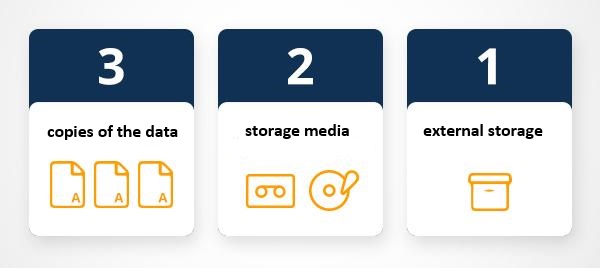
Keeping a copy of all your data (working, raw, and completed) both in the cloud (recommended) and on your computer is incredibly important. This ensures that if you experience a computer failure, accidentally delete your data, or encounter data corruption, your research remains recoverable and restorable.
When working with and processing data, it is also extremely important to always keep at least one copy of the original data. The original data should never be deleted; instead, you should copy the data and delete only sections of the copy while retaining the original data intact.
The 3-2-1 backup rule has been developed as a guide against data loss [@mcmaster2021data]. According to this rule, one should strive to have at least three copies of your project stored in different locations. Specifically, maintain at least three (3) copies of your data, storing backup copies on two (2) different storage media, with one (1) of them located offsite. While this guideline may vary depending on individual preferences, I personally adhere to this approach for safeguarding my projects.

on my personal notebook
on at least one additional hard drive (that you keep in a secure location)
in an online repository (for example, UQ’s Research Data Management system (RDM) OneDrive, MyDrive, GitHub, or GitLab)
Using online repositories ensures that you do not lose any data in case your computer crashes (or in case you spill lemonade over it - don’t ask…) but it comes at the cost that your data can be more accessible to (criminal or other) third parties. Thus, if you are dealing with sensitive data, I suggest to store it on an additional external hard drive and do not keep cloud-based back-ups. If you trust tech companies with your data (or think that they are not interested in stealing your data), cloud-based solutions such as OneDrive, Google’s MyDrive, or Dropbox are ideal and easy to use options (however, UQ’s RDM is a safer option).
The UQ library also offers additional information on complying with ARC and NHMRC data management plan requirements and that UQ RDM meets these requirements for sensitive data (see here).
GOING FURTHER
For Beginners
- Get your data into UQ’s RDM or Cloud Storage - If you need help, talk to the library or your tech/eResearch/QCIF Support
For Advanced backupers
- Build a policy for your team or group on where things are stored. Make sure the location of your data is saved in your documentation
Dealing with Sensitive Data
This section will elaborate on who to organize and handle (research) data and introduce some basic principles that may help you to keep your data tidy.
Tips for sensitive data
- Sensitive data are data that can be used to identify an individual, species, object, or location that introduces a risk of discrimination, harm, or unwanted attention. Major, familiar categories of sensitive data are: personal data - health and medical data - ecological data that may place vulnerable species at risk.
Separating identifying variables from your data
Separating or deidentifying your data has the purpose to protect an individual’s privacy. According to the Australian Privacy Act 1988, “personal information is deidentified if the information is no longer about an identifiable individual or an individual who is reasonably identifiable”. Deidentified information is no longer considered personal information and can be shared. More information on the Commonwealth Privacy Act can be located here.
Deidentifying aims to allow data to be used by others for publishing, sharing and reuse without the possibility of individuals/location being re-identified. It may also be used to protect the location of archaeological findings, cultural data of location of endangered species.
Any identifiers (name, date of birth, address or geospatial locations etc) should be removed from main data set and replaced with a code/key. The code/key is then preferably encrypted and stored separately. By storing deidentified data in a secure solution, you are meeting safety, controlled, ethical, privacy and funding agency requirements.
Re-identifying an individual is possible by recombining the deidentifiable data set and the identifiers.
Managing Deidentification (ARDC)
Plan deidentification early in the research as part of your data management planning
Retain original unedited versions of data for use within the research team and for preservation
Create a deidentification log of all replacements, aggregations or removals made
Store the log separately from the deidentified data files
Identify replacements in text in a meaningful way, e.g. in transcribed interviews indicate replaced text with [brackets] or use XML mark-up tags.
Management of identifiable data (ARDC)
Data may often need to be identifiable (i.e. contains personal information) during the process of research, e.g. for analysis. If data is identifiable then ethical and privacy requirements can be met through access control and data security. This may take the form of:
Control of access through physical or digital means (e.g. passwords)
Encryption of data, particularly if it is being moved between locations
Ensuring data is not stored in an identifiable and unencrypted format when on easily lost items such as USB keys, laptops and external hard drives.
Taking reasonable actions to prevent the inadvertent disclosure, release or loss of sensitive personal information.
Safely sharing sensitive data guide (ARDC)
Australian practical guidance for Deidentification (ARDC)
- Australian Research Data Commons (ARDC) formerly known as Australian National Data Service (ANDS) released a fabulous guide on Deidentification. The Deidentification guide is intended for researchers who own a data set and wish to share safely with fellow researchers or for publishing of data. The guide can be located here.
Nationally available guidelines for handling sensitive data
The Australian Government’s Office of the Australian Information Commissioner (OAIC) and CSIRO Data61 have released a Deidentification Decision Making Framework, which is a “practical guide to deidentification, focusing on operational advice”. The guide will assist organisations that handle personal information to deidentify their data effectively.
The OAIC also provides high-level guidance on deidentification of data and information, outlining what deidentification is, and how it can be achieved.
The Australian Government’s guidelines for the disclosure of health information, includes techniques for making a data set non-identifiable and example case studies.
Australian Bureau of Statistics’ National Statistical Service Handbook. Chapter 11 contains a summary of methods to maintain privacy.
med.data.edu.au gives information about anonymisation
The Office of the Information Commissioner Queensland’s guidance on deidentification techniques can be found here
Data as publications
More recently, regarding data as a form of publications has gain a lot of traction. This has the advantage that it rewards researchers who put a lot of work into compiling data and it has created an incentive for making data available, e.g. for replication. The UQ RDM and UQ eSpace can help with the process of publishing a dataset.
There are many platforms where data can be published and made available in a sustainable manner. Below are listed just some options that are recommendable:
UQ Research Data Manager
The UQ Research Data Manager (RDM) system is a robust, world-leading system designed and developed here at UQ. The UQ RDM provides the UQ research community with a collaborative, safe and secure large-scale storage facility to practice good stewardship of research data. The European Commission report “Turning FAIR into Reality” cites UQ’s RDM as an exemplar of, and approach to, good research data management practice. The disadvantage of RDM is that it is not available to everybody but restricted to UQ staff, affiliates, and collaborators.
Open Science Foundation
The Open Science Foundation (OSF) is a free, global open platform to support your research and enable collaboration.
TROLLing
TROLLing | DataverseNO (The Tromsø Repository of Language and Linguistics) is a repository of data, code, and other related materials used in linguistic research. The repository is open access, which means that all information is available to everyone. All postings are accompanied by searchable metadata that identify the researchers, the languages and linguistic phenomena involved, the statistical methods applied, and scholarly publications based on the data (where relevant).
Git
GitHub offers the distributed version control using Git. While GitHub is not designed to host research data, it can be used to share share small collections of research data and make them available to the public. The size restrictions and the fact that GitHub is a commercial enterprise owned by Microsoft are disadvantages of this as well as alternative, but comparable platforms such as GitLab.
Software
Using free, open-source software for data processing and analysis, such as Praat, R, Python, or Julia, promotes transparency and reproducibility by reducing financial access barriers and enabling broader audiences to conduct analyses. Open-source tools provide a transparent and accessible framework for conducting analyses, allowing other researchers to replicate and validate results while eliminating access limitations present in commercial tools, which may not be available to researchers from low-resource regions [see @heron2013open for a case-study on the use of free imaging software].
In contrast, employing commercial tools or multiple tools in a single analysis can hinder transparency and reproducibility. Switching between tools often requires time-consuming manual input and may disadvantage researchers from low-resource regions who may lack access to licensed software tools. While free, open-source tools are recommended for training purposes, they may have limitations in functionality [@heron2013open, 7/36].