Part 3 Organizing Projects
In this section, we focus on what researchers can do to render their workflows more transparent, recoverable, and reproducible.
A very easy-to-implement, yet powerful method for maintaining a tidy and transparent workflow relates to project management and organization. Below are some tips to consider when planning and organizing projects.
Folder Structures
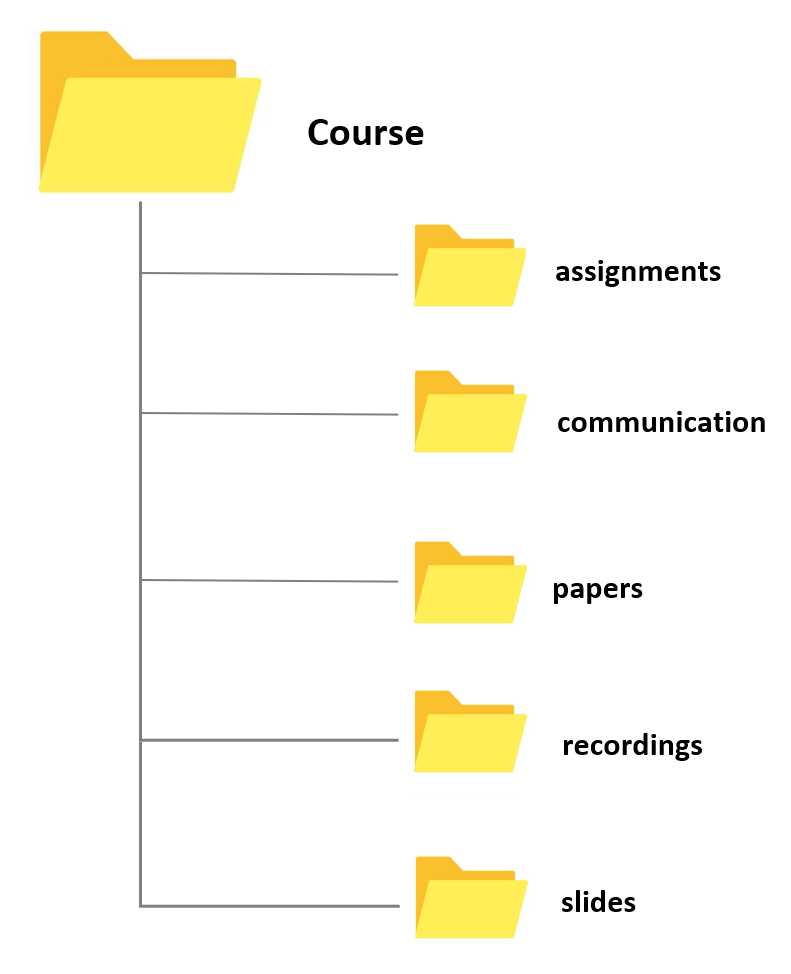
Different methods of organizing your folders have unique advantages and challenges, but they all share a reliance on a tree-structure hierarchy, where more general folders contain more specialized subfolders. For instance, if your goal is to locate any file with minimal clicks, an alphabetical folder structure might be effective. In this system, items are stored based on their initial letter (e.g., everything starting with a “T” like “travel” under “T”, or everything related to “courses” under “C”). However, this method can be unintuitive as it groups completely unrelated topics together simply because they share the same initial letter.
A more common and intuitive approach is to organize your data into meaningful categories that reflect different aspects of your life. For example:
Work: This can include subfolders like Teaching and Research.
Personal: This can encompass Rent, Finances, and Insurances.
Media: This might include Movies, Music, and Audiobooks.
This method not only makes it easier to locate files based on context but also keeps related topics grouped together, enhancing both accessibility and logical organization.
To further improve folder organization, consider the following best practices:
- Consistency: Use a consistent naming convention to avoid confusion.
- Clarity: Use clear and descriptive names for folders and files.
- Date-Based Organization: For projects that evolve over time, include dates in the folder names.
- Regular Maintenance: Periodically review and reorganize your folders to keep them tidy and relevant.
Folders and files should be labeled in a meaningful and consistent way to avoid ambiguity and confusion. Avoid generic names like Stuff or Document for folders, and doc2 or homework for files. Naming files consistently, logically, and predictably helps prevent disorganization, misplaced data, and potential project delays. A well-thought-out file naming convention ensures that files are:
- Easier to Process: Team members won’t have to overthink the file naming process, reducing cognitive load.
- Easier to Access, Retrieve, and Store: A consistent naming convention facilitates quick and easy access to files.
- Easier to Browse Through: Organized files save time and effort when searching through directories.
- Harder to Lose: A logical structure makes it less likely for files to be misplaced.
- Easier to Check for Obsolete or Duplicate Records: Systematic naming aids in identifying and managing outdated or redundant files.
The UQ Library offers the Digital Essentials module Working with Files. This module contains information on storage options, naming conventions, back up options, metadata, and file formats. Some of these issues are dealt with below but the materials provided by the library offer a more extensive introduction into these topics.
By implementing these strategies, you can create a folder structure that is not only efficient but also scalable, accommodating both your current needs and future expansions.
Folders for Research and Teaching
Having a standard folder structure can keep your files neat and tidy and save you time looking for data. It can also help if you are sharing files with colleagues and having a standard place to put working data and documentation.
Store your projects in a separate folder. For instance, if you are creating a folder for a research project, create the project folder within a separate project folder that is within a research folder. If you are creating a folder for a course, create the course folder within a courses folder within a teaching folder, etc.
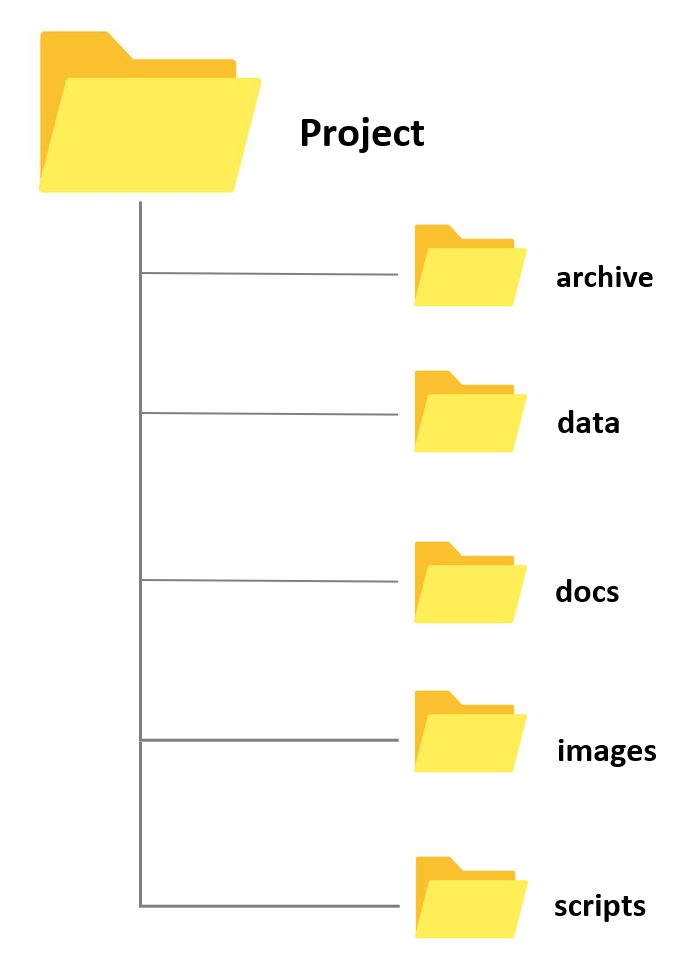
Whenever you create a folder for a new project, try to have a set of standard folders. For example, when I create research project folders, I always have folders called archive, data, docs, and images. When I create course folders, I always have folders called slides, assignments, exam, studentmaterials, and correspondence. However, you are, of course, free to modify and come up or create your own basic project design. Also, by prefixing the folder names with numbers, you can force your files to be ordered by the steps in your workflow.
- Having different sub folders allows you to avoid having too many files and many different file types in a single folder. Folders with many different files and file types tend to be chaotic and can be confusing. In addition, I have one ReadMe file on the highest level (which only contains folders except for this one single file) in which I describe very briefly what the folder is about and which folders contain which documents as well as some basic information about the folder (e.g. why and when I created it). This ReadMe file is intended both for me as a reminder what this folder is about and what it contains but also for others in case I hand the project over to someone else who continues the project or for someone who takes over my course and needs to use my materials.
File Naming Convention (FNC)
One of the most basic but also most important practices a researcher can do to improve the reproducibility and transparency of their research is to follow a consistent file naming convention. A File Naming Convention (FNC) is a systematic framework for naming your files in a way that clearly describes their contents and, importantly, how they relate to other files. Establishing an agreed-upon FNC before collecting data is essential as it ensures consistency, improves organization, and facilitates easier retrieval and collaboration. By establishing a clear and consistent File Naming Convention, you can significantly improve the efficiency and effectiveness of your data management practices, making it easier to handle, share, and preserve important information.
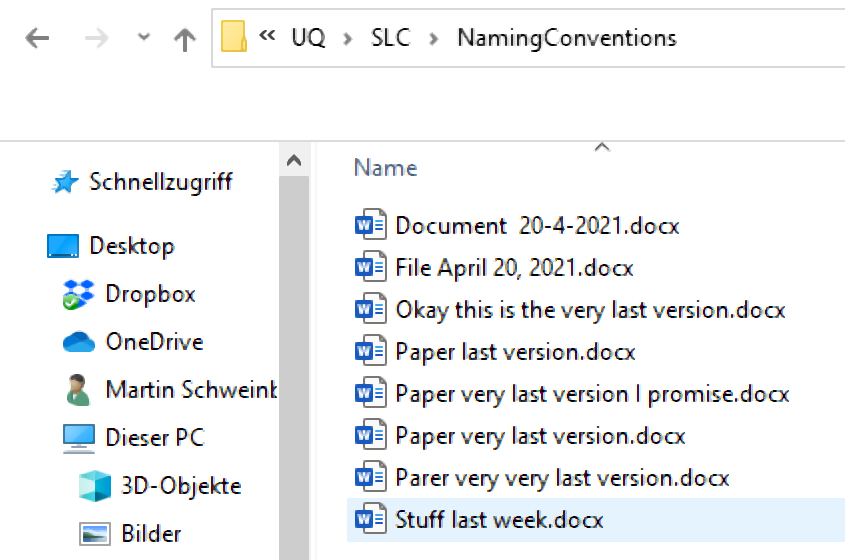
Key elements to consider when creating a File Naming Convention include:
Descriptive Names: Use clear and descriptive names that provide information about the file’s content, purpose, and date. Avoid vague or generic names.
Consistency: Apply the same naming format across all files to maintain uniformity. This includes using consistent date formats, abbreviations, and capitalization.
Version Control: Incorporate version numbers or dates in the file names to track revisions and updates. For example, “ProjectReport_v1.0_2024-05-22.docx”.
Avoid Special Characters: Use only alphanumeric characters and underscores or hyphens to avoid issues with different operating systems or software.
Length and Readability: Keep file names concise yet informative. Avoid overly long names that may be difficult to read or cause problems with file path limitations.
Organizational Context: Reflect the file’s place within the broader project or system. For example, use a prefix that indicates the department or project phase.
Example of a File Naming Convention:
[ProjectName]_[DocumentType]_[Date]_[Version].[Extension]Example:
ClimateStudy_Report_20240522_v1.0.docx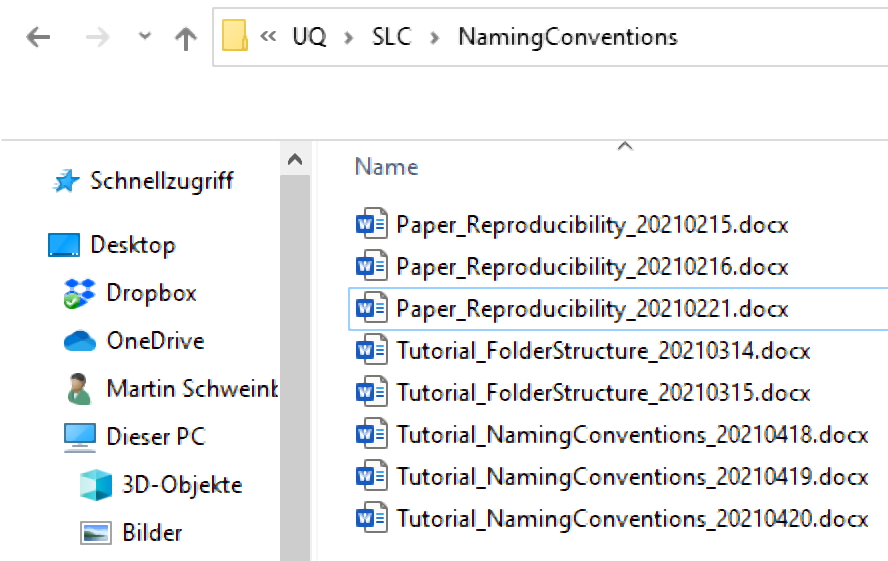
Here are some additional hints for optimizing file naming:
Avoid Special Characters: Special characters like +, !, “, -, ., ö, ü, ä, %, &, (, ), [, ], &, $, =, ?, ’, #, or / should be avoided. They can cause issues with file sharing and compatibility across different systems. While underscores (_) are also special characters, they are commonly used for readability.
No White Spaces: Some software applications replace or collapse white spaces, which can lead to problems. A common practice is to capitalize initial letters in file names to avoid white spaces (e.g., TutorialIntroComputerSkills or Tutorial_IntroComputerSkills).
Include Time-Stamps: When adding dates to file names, use the YYYYMMDD format. This format ensures that files are easily sorted in chronological order. For example, use TutorialIntroComputerSkills20230522 or Tutorial_IntroComputerSkills_20230522.
Benefits of a robust File Naming Convention include:
- Enhanced Organization: Files are easier to categorize and locate.
- Improved Collaboration: Team members can understand and navigate the file structure more efficiently.
- Consistency and Standardization: Reduces errors and confusion, ensuring that everyone follows the same system.
- Streamlined Data Management: Simplifies the process of managing large volumes of data.
For comprehensive guidance, the University of Edinburgh provides a detailed list of 13 Rules for File Naming Conventions with examples and explanations. Additionally, the Australian National Data Service (ANDS) offers a useful guide on file wrangling, summarized below.